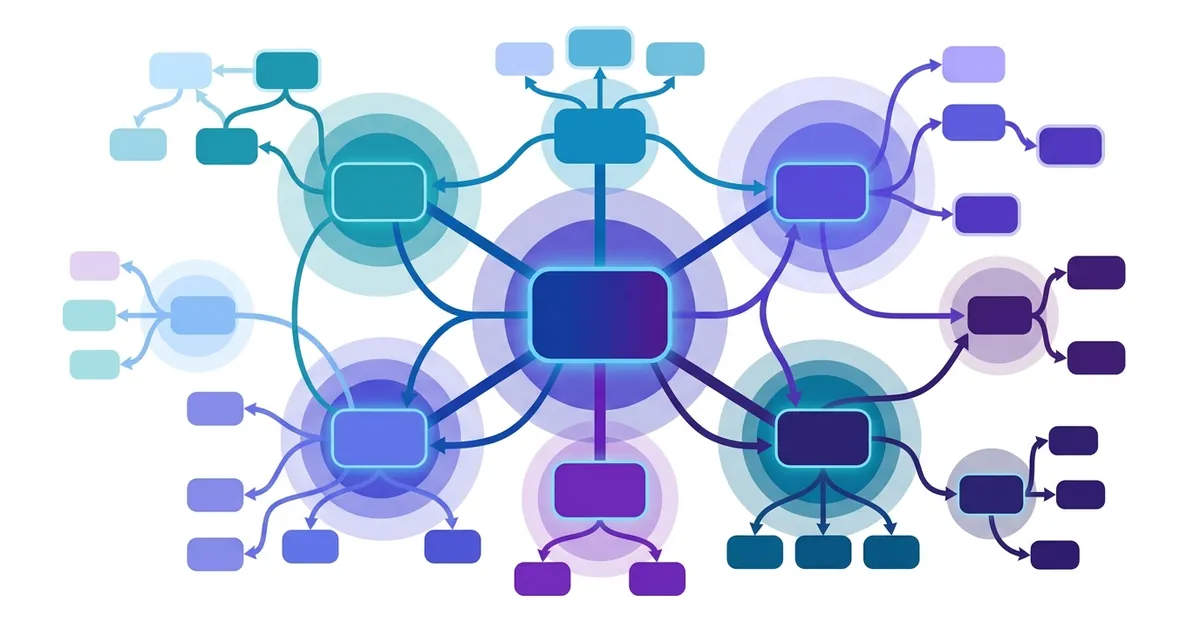
Internal linking connects pages within your WordPress site to guide both users and search engines through your content. Every major ranking boost in 2024–2025 came from reorganising internal structure, not acquiring new backlinks. Internal links distribute page authority throughout your site, direct Googlebot to discover deeper pages, and help Google understand topical relationships between your content. Without them, pages sit orphaned—invisible to search engines and unreachable by users. Anchor text (the clickable text of a link) is a ranking factor; sites using strategic anchor text optimisation report up to 40% better organic traffic. This alone makes internal linking one of the most underrated SEO components WordPress publishers overlook.

Pillar pages and topic clusters explained
A pillar-cluster architecture is the modern standard for topical authority. The pillar is a comprehensive overview—typically 2,000+ words covering the full breadth of a topic. Surrounding it are cluster pages, each diving into a specific subtopic and linking back to the pillar. A typical pillar supports three to six cluster pages, though the model scales to larger ecosystems.
This structure aligns with how Google’s algorithm evaluates topical authority and semantic relevance. When cluster pages consistently link to their pillar and reference related clusters, they signal to Google that your site has cohesive, interconnected expertise on that topic. Sites implementing this model report up to 200% traffic increases in a single month because both the pillar and clusters begin ranking for their target keywords simultaneously.
Pillar pages also attract more backlinks—they’re comprehensive enough that other sites cite them as authoritative references. This creates a virtuous cycle: the pillar ranks well, gets linked externally, passes that authority back to clusters via internal links, and clusters rank for their own queries.
Building this structure manually requires planning cluster topics, writing content in order, and manually linking each piece. Automated content services benefit from pillar-cluster architecture because they can generate cluster pages daily and programmatically link them to the pillar, creating topical authority without manual WordPress editor work. Makasete, for example, runs an 8-step pipeline—keyword research through WordPress publishing—that handles cluster content and internal linking automatically from $40/month. This is particularly valuable for sites that need to publish consistently: the system writes the cluster post, optimises anchor text, publishes to WordPress, and links everything—no human intervention required.
How to build internal link structure in WordPress
Adding an internal link in WordPress takes seconds. Open the block editor, highlight the anchor text you want to link, press Ctrl+K (Windows) or Cmd+K (Mac), search for your target post by title or keyword, and select it from the dropdown. Leave the nofollow checkbox unchecked—internal links should pass authority.
The most valuable links are contextual links embedded in paragraph text, not navigation-only links. A link to your pillar page buried in the navigation menu passes far less ranking signal than the same link positioned mid-paragraph where it answers a reader’s question naturally.
Target two to three internal links on short content. Never exceed 10 per page. Keep link density to 1–2% of total words—roughly one link per 300 words. More than this dilutes link equity and signals a link farm rather than editorial intent.
Manual linking at scale becomes labour-intensive and error-prone. Automated content platforms handle internal linking programmatically—writing contextual links directly into the content, publishing the post, and linking it to relevant existing pages through WordPress APIs. This removes the workflow friction that causes most WordPress publishers to skip internal linking entirely.
Anchor text optimization with keyword variation
Anchor text tells search engines what the linked page is about. Use descriptive phrases, not vague calls-to-action. Never use “click here,” “read more,” “this article,” or “learn more.” Instead, write anchor text that signals the linked page’s topic: “WordPress SEO best practices,” “on-page optimisation tactics,” “technical SEO foundations.”
Vary anchor text when linking to the same page from multiple posts. If you link to your pillar page five times across different cluster articles, use five different anchor phrases. This tells Google you have diverse content pointing to the same resource, not keyword-stuffed anchor text.
Finding and fixing orphan pages
Orphan pages have zero incoming internal links. Search engines can’t crawl them without a direct URL. Use Screaming Frog or Ahrefs to crawl your WordPress site and export a report of pages with no incoming links. Prioritise fixing orphan pages that target valuable keywords but rank nowhere.
Add one contextual internal link from a topically relevant existing page to each orphan. If the orphan page is weak (thin content, unclear purpose), rewrite it first to ensure it’s linkable—worth linking to. Then publish the link and monitor rankings for 4–8 weeks.
Link equity distribution and crawl depth optimization
Each internal link passes a small amount of SEO value—called link equity or link juice—to the target page. The more authority a page has, the more value its links carry. This is why limiting internal links to 2–10 per page matters: fewer links mean each one carries more weight.
Crawl depth is the number of clicks Googlebot needs to reach a page from your homepage. Structure important pages so they’re reachable within three clicks. Pages buried four or more clicks deep rank poorly because Google deprioritises crawling them.
Use WordPress category and tag pages as natural hubs. They automatically aggregate and link to related posts, creating a natural hierarchy without manual work. Redirect old or deleted pages to relevant new ones—don’t leave 404 errors. A redirect preserves link equity; a 404 wastes it.
WordPress plugins and tools for internal linking audit
All in One SEO (AIOSEO) includes Link Assistant, which suggests internal linking opportunities as you edit. Rank Math and SEOPress offer built-in internal linking recommendations during post editing. Link Whisper and Linkilo are dedicated plugins that scan your content and suggest contextual link placements based on existing pages.
For full-site audits, Screaming Frog crawls your entire WordPress site and exports a report showing pages with no incoming links, page depth, and link structure. Google Search Console reveals crawl errors and pages Google can’t reach—use this to identify broken internal links or redirect chains. Ahrefs Site Explorer shows your internal link structure, anchor text distribution, and crawl depth metrics.
Choose based on workflow: plugin-based suggestions during editing work well if you publish infrequently. Post-publication audits suit sites publishing regularly.
Common internal linking mistakes to avoid
Over-optimising anchor text is the most common mistake. Using your exact keyword phrase in every anchor looks spammy and triggers penalties. Vary your language.
Linking to irrelevant pages violates Google guidelines and frustrates readers. Links must feel natural and add value. Broken internal links (outdated links to deleted pages) waste crawl budget and frustrate users—audit regularly and fix.
Orphan pages never rank. Relying solely on navigation links ignores the ranking power of contextual body links. More than 10 links per page dilutes equity and suggests a link farm rather than editorial intent.
Auditing and improving your existing internal link structure
Export your WordPress site structure from Google Search Console or use a crawler to understand your current link depth. Identify pages ranked below position 20 that have no incoming internal links—these are prime candidates for linking campaigns.
Audit anchor text distribution. Look for over-optimised anchors (the same phrase used five or more times) and balance them with natural variations. Check redirect chains: if page A redirects to B and B redirects to C, consolidate to a direct A-to-C redirect and preserve link equity.
Review category and tag pages. Are they logically structured? Do they naturally aggregate related content? Create a linking audit spreadsheet listing orphan pages, pages with high potential, and planned links for each quarter. Track rankings and impressions for newly linked pages; expect gains within 4–8 weeks.
Internal linking sits at the intersection of user experience and technical SEO. Implement it consistently and you’ll see measurable gains in pages per session, bounce rate, engagement, and impressions. Start by mapping your pillar-cluster topics, then systematically link cluster pages to pillars and across clusters. If you publish frequently enough to need consistency, consider whether a broader WordPress SEO strategy built on automated daily content publication might complement your linking efforts—platforms that publish multiple cluster pages per week make the pillar-cluster model easy to scale because internal linking happens programmatically.
For foundation-level decisions, begin with keyword research for your WordPress site to identify your pillar topics and clusters. You’ll find WordPress plugins that support linking helpful for ongoing audits. And if content consistency is your bottleneck, review your content production workflow to see whether outsourcing that piece might free you to focus on architecture and strategy instead.